OnPrintShop Version 13.1 introduces dynamic mask generation, AI-powered templates, PDF-based design blocks, flexible product configuration, and workflow enhancements to help print businesses simplify everyday operations.
The latest release expands the platform’s capabilities across Designer Studio, the storefront, and the Admin Panel, helping print businesses reduce manual effort and manage everyday tasks with greater flexibility.
From generating product masks and design templates to simplifying product setup, quote management, order processing, and customer access, Version 13.1 brings practical improvements to multiple stages of the print ordering journey.
Design creation received significant attention in Version 13.1 with new tools designed to reduce repetitive work and simplify how print businesses prepare design assets.
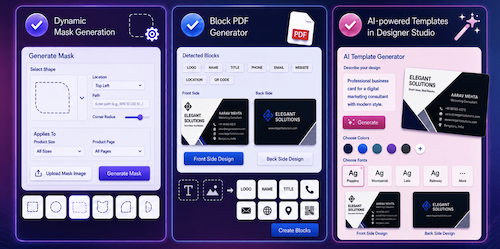
One of the key additions is Dynamic Mask Generation, which enables users to generate product masks directly within OnPrintShop. Users can select a shape and configure the required mask details without depending entirely on pre-prepared mask images. The existing option to upload mask images remains available, giving businesses flexibility in managing their product assets.
The release also introduces the Block PDF Generator, allowing users to create individual design blocks directly from PDF artwork. The system automatically identifies text and image elements within the PDF, making it easier to convert existing artwork into reusable blocks without requiring Adobe Acrobat or additional plugins.
Another major addition is AI-powered templates in Designer Studio. Users can provide clear prompts describing the design they want, and the system generated templates based on those instructions. This reduces the manual effort involved in creating design starting points and helps businesses accelerate template production.
Together, these capabilities make it easier for print businesses to create, prepare, and manage design assets within a single web-to-print environment.
Version 13.1 also introduces improvements aimed at helping administrators manage orders more efficiently. A new rush order indicator makes urgent jobs easier to identify during order processing. Administrators can recognise priority orders at a glance, helping teams focus attention on jobs that require faster handling.
The release also streamlines the process of creating customer-specific designs during order modifications. Admins can now create a new customer design or version directly from the Order Modify page using Designer Studio. Once created, the resulting template is automatically saved and assigned to the relevant order.
By connecting order modification and design creation more closely, this enhancement reduces unnecessary navigation and helps teams respond more efficiently to customer design requirements.
Product management becomes more flexible with the ability to manage standard and die-cut configurations within a single product. Previously, businesses that offered both configurations could need separate product setups. Version 13.1 allows them to manage both options together, reducing duplicate product administration and making catalogues easier to maintain.
This improvement gives print businesses greater flexibility when offering products with different shape or cutting requirements while simplifying the backend management of those products.
Phone-Based Login Added More Convenience
Customer account access also received an important usability enhancement.
With Version 13.1, customers can sign up and log in using their phone numbers, providing an alternative to email-based authentication.
The addition gives storefront owners another way to accommodate customer preferences and created a more convenient account access experience, particularly for customers who primarily interact with storefronts through mobile devices.
More Flexible Image and CMS Management
Version 13.1 expands the tools available for managing storefront content and visual assets.
Users can now edit uploaded images directly within the platform using crop, rotate, flip, and zoom functions. The original image remains unchanged, while the edited version is saved as a new image. This allows users to prepare assets for specific applications without modifying the original file.
The CMS also received a major usability improvement. Administrators can create responsive CMS pages without writing HTML or CSS, using drag-and-drop Bootstrap layouts, content blocks, styling options, and device previews.
This makes it easier for businesses to build and manage responsive storefront pages while giving non-technical teams greater control over their website content.
Quote and Quantity Management Became More Flexible
Version 13.1 improves the quoting experience for both administrators and customers.
Incomplete quotes can now be saved as drafts, allowing teams to return to unfinished quotes without having to recreate them. The partial quote experience was also refined with an improved interface for reviewing and ordering approved items.
Quantity selection became more flexible through the new ‘Other’ option in the Price Calculator. Customers can choose from predefined quantities or enter a custom quantity when their requirements fall outside the available options.
These improvements help make quoting and ordering more adaptable to different customer requirements while reducing friction in the purchasing process.
4over Products Expanded into Shopping Feeds
Version 13.1 also extends product promotion capabilities by enabling admins to include 4over products in Google and Facebook Shopping Feeds.
The system automatically identifies valid product combinations based on selected options and includes only supported combinations in the feeds. This reduces the manual effort required to determine which product configurations can be promoted through external shopping channels.
For businesses using 4over products, the enhancement creates another way to expand product visibility while keeping feed management more efficient.
Continuing the Evolution of Web-to-Print
With Version 13.1, OnPrintShop continues its focus on combining AI, automation, flexibility, and usability to address the evolving needs of print businesses.
The release brings improvements across the design, storefront, quoting, product, order, and administrative experiences. Rather than focusing on a single area, it strengthens a wide range of everyday workflows that contribute to a more efficient print operation.
From AI-generated design templates and automated PDF block creation to streamlined product management, faster rush order identification, and more flexible customer interactions, Version 13.1 gives print businesses new ways to reduce manual work and improve operational efficiency.
Alongside these enhancements, OnPrintShop also resolves identified bugs to further improve platform performance, stability, and the overall user experience.
Version 13.1 marks another step forward in OnPrintShop’s vision of delivering a smarter web-to-print platform. By bringing intelligent design tools together with practical workflow improvements, the latest release helps print businesses simplify operations, respond faster to customer needs, and create a more seamless digital print experience.
ONPRINTSHOP
www.onprintshop.com